Understanding Agent Who usage limits
Last updated: July 27, 2026
Agent Who searches consume your account’s allotted usage. Measured separately from your Influ2 slots, you can see exactly how much capacity a search will use before you commit to it.
What it is
Every contact Agent Who finds and successfully enriches with a business email counts towards your usage limit.
This includes contacts that turn out to already be in your CRM because Agent Who has to find and enrich a person before it can check them against your CRM.
Accounts work differently: if you turn on "Skip accounts already in CRM," those companies are never searched at all.
What you'll see
When you approve a search, the summary modal shows:
Total contacts to find and Max contacts per account — the volume you're requesting.
Credits this search will consume and your remaining Agent Who credit balance.
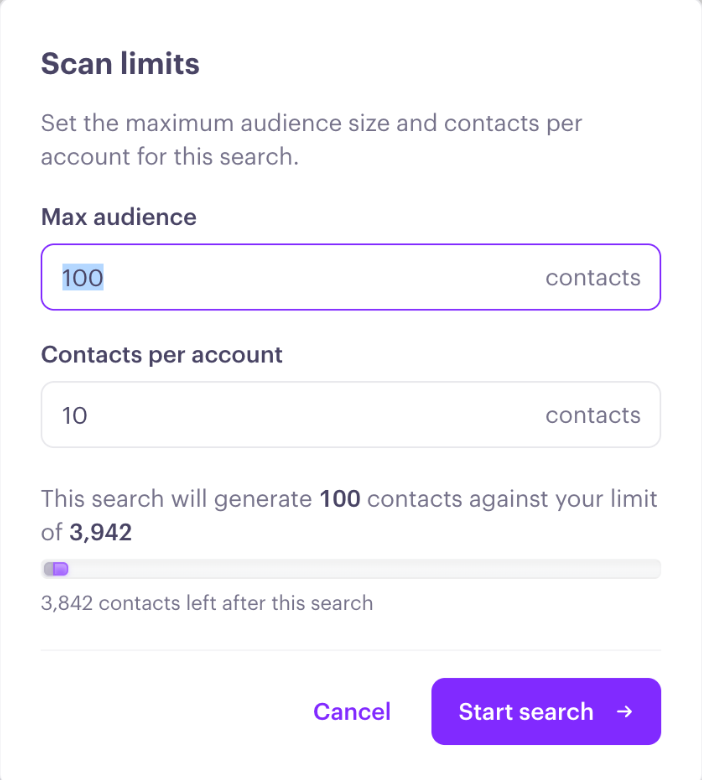
If the credits needed are more than what you have left, Influ2 blocks the search from starting and shows "You don't have enough credits to complete the search. Reduce the search volume or contact your CSM." Lower your Total contacts to find, or reach out to your CSM to increase your allowance.
How to use this
Credits aren't deduplicated across audiences. If the same person turns up in two different searches, each one is counted separately — worth remembering if you're running several overlapping searches.
Turning on Skip accounts already in CRM reduces spend on accounts you already have, since those companies are never searched. It doesn't change billing for contacts found at accounts that do get searched — those are billed whether or not they match your CRM.
If you stop a search early, you're only counted for what was found up to that point.
What's next
If you have questions about your allotted Agent Who usage, please reach out to your Customer Success Manager.