Understanding Website Visitor Identification
Last updated: August 11, 2026
Most of your best prospects visit your website and leave without filling out a form. Influ2's Website Visitor Identification lets you see exactly who those visitors are — their name, title, company, and the pages they browsed — so your sales team can reach out while intent is at its peak. This feature is available to Audienscope clients.
What it is
Website Visitor Identification means Influ2 can recognize and surface detailed information about individual visitors to your website — not just the company they work for, but the specific person. By linking online activity to real people, you can directly engage high-value prospects who've already shown interest, without waiting for them to raise their hand.
How to enable Website Visitor Identification
To start identifying website visitors, you need to install Influ2's tracking script in the <head> section of your website.
If you've already installed the Influ2 tracking pixel — no action is needed. Visitor identification data will start flowing automatically.
Where to find Website Visit signals
Once enabled, Website Visit signals show up across Influ2 wherever you'd expect to see buyer activity.
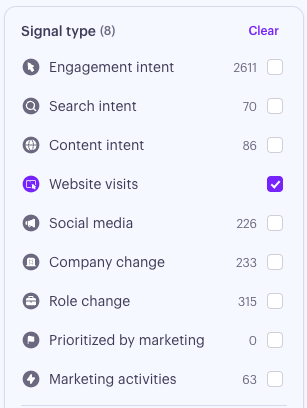
Signals Center — use the Website Visit filter under Signal Type.
Target Report — the contact's Marketing Timeline lists each website visit alongside their ad impressions and engagements, so reps see the full picture of how someone is interacting with your brand.
Buying Group Report — website visits show up in the activity feed, on the engagement graph, and inside the Intent summary card (where you can switch between Search Intent, Content Intent, Social Posts, and Website Visit). The Audience table also rolls website visits into each target's Signals total.
Programs Summary — the Intent scorecard includes a sub-metric for Website Visits, and the Audience table's Signals column counts website visits along with the other intent types.
Prospect Interests — the topic of a website visit flows into the prospect's 90-day Interests block, so the topics they've been researching stay visible at a glance.
Slack, Microsoft Teams, and Email notifications — Website Visit signals are sent under the Intent notification group.
Keep in mind: a Website visit is different from a Visit. A Visit is a landing page visit that followed an ad engagement; a Website visit is a visit to your website that is not tied to an ad, captured by Influ2's Website Visitor Identification.
What you'll see
Each Website Visit signal includes:
Full Name: Who visited your site.
Company: Where they work — so you can cross-reference against your target accounts.
Title: Their job title, so you can tailor your message to their role and priorities.
Business Email: (when found) A direct line for outreach when available.
LinkedIn Profile: Lets you quickly research the person's background and connect before reaching out.
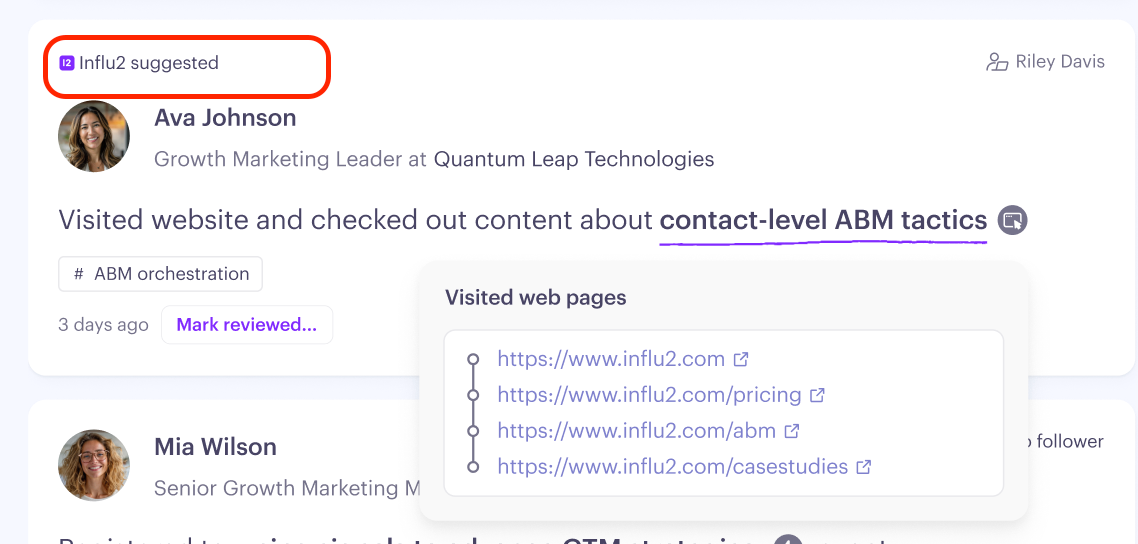
Pages Visited: The specific URLs they browsed — a strong signal for understanding what they're evaluating.
Understanding topics of interest
Influ2 analyzes the content of each page a visitor viewed and automatically assigns a topic of interest to the signal from the topic created under Account settings. This tells you what the prospect is likely evaluating — without you having to read through every URL manually.
Topics are based on the actual content of the visited pages, so they reflect real intent rather than assumptions.
How followers are assigned
If the visitor matches someone in your active audience — Influ2 assigns a follower based on your standard follower rules. If no follower rule applies, the signal appears as Unassigned.
If the visitor is new and outside your current target audience — the signal is marked Influ2 Suggested and won't be assigned to a specific user. It's still visible in your feed so you can act on it.
Keep in mind: New signals represent real buying intent from people you haven't targeted yet — worth a look.
Getting notified about website visits
Don't want to rely on checking Signals Center manually? Set up a Slack or Microsoft Teams channel to receive real-time notifications for every Website Visit signal — including visitors who don't yet have an assigned follower.
Go to Account Setup → Follower Settings to configure your channel integration.
FAQ
Can Influ2 identify visitors from Europe?
Not currently. Due to privacy compliance requirements, Website Visitor Identification only works for US-based traffic. EMEA visitors cannot be identified.
Can I create CRM records for new visitors automatically?
Not currently. This is something Influ2 is actively exploring — and your feedback matters here. If you have a view on how new visitor data should sync to your CRM (including who should be assigned as the contact owner), reach out to your Customer Success Manager or share feedback directly in the product.